Nonprofit impact reporting is the process of communicating your organization’s outcomes, financials, and program results to donors, board members, and funders. Done well, it closes the loop on donor investment and drives repeat giving. Done poorly, it gets skimmed and deleted.
The difference usually comes down to how you present data. Numbers buried in dense paragraphs lose people. The same numbers in a well-designed chart or infographic make your case in 10 seconds.
At Charity Charge, we work with nonprofits across every sector, and the finance and operations leaders we talk to consistently underestimate how much reporting quality affects donor retention.
Quick Summary
- Donor retention rates for North American nonprofits have dropped to roughly 40-45%, according to the Fundraising Effectiveness Project. Impact reports are one of the strongest tools for improving that number.
- Data visualizations make outcomes memorable. Donors scan reports; they don’t read them. Visuals ensure key messages land regardless.
- The right chart type depends on what story you’re telling: proportions, trends, geography, or comparisons each call for different formats.
- Financial transparency through simple charts (pie, bar) builds more trust than dense spreadsheets.
- Impact reports should segment by donor tier: major donors get granular breakdowns; general supporters get aggregate highlights.
What we will cover
What Is a Nonprofit Impact Report?
A nonprofit impact report is a structured document or webpage that communicates your organization’s outcomes, financial accountability, and the direct effect of donor contributions over a given period. It differs from an annual report primarily in scope: an annual report covers governance, board activity, and audited financials in full; an impact report zeroes in on what changed because of your work and your donors’ support.
Impact reports can be published as PDFs, interactive web pages, email summaries, or a combination. The format matters less than the structure: outcomes first, financial transparency second, clear calls to action third.
Why Data Visualizations Matter for Donor Retention
Donor retention is a genuine crisis for the nonprofit sector. According to the Fundraising Effectiveness Project, North American nonprofits are retaining roughly 40-45% of donors year over year, and first-time donor retention sits even lower. The sector is raising more dollars from fewer people, which is an unstable position.
Impact reporting directly addresses one of the root causes: donors who don’t see their contribution’s effect stop giving. Showing clear, visual evidence of outcomes creates the emotional and logical case for renewing.
Visualizations work because donors scan, they don’t read. A well-placed progress bar, a before/after comparison, or a map of program reach communicates more in a glance than three paragraphs of narrative. According to research cited by Data Orchard, fewer than half of nonprofits analyze and communicate their data in useful, meaningful ways. That gap is an opportunity for organizations willing to invest in cleaner reporting.
The 6 Chart Types Nonprofits Use Most (and When to Use Each)
Choosing the wrong chart type is one of the most common impact reporting mistakes. Each visualization format is suited to a specific kind of data story.
| Chart Type | Best For | Example Use Case |
|---|---|---|
| Bar chart (vertical or horizontal) | Year-over-year comparisons, group comparisons | Donor growth by year, program enrollment by site |
| Line graph | Trends over time | Monthly recurring gift growth, beneficiaries served per quarter |
| Pie / donut chart | Fund allocation, revenue source breakdown | “82% to direct programs, 11% admin, 7% fundraising” |
| Progress bar | Goal vs. actual, campaign performance | “$340K raised toward $400K annual goal” |
| Heatmap | Geographic density, regional engagement | Donor zip codes, program reach by county |
| Geographic map | Physical program locations, international reach | Home build sites, food distribution points |
One rule applies across all of them: one chart per key message. Stacking three metrics into a single visual creates confusion. If you have three things to say, use three charts.
How to Structure an Impact Report That Donors Actually Read
Most impact reports fail at the structural level before the design even matters. Here’s the structure that works.
1. Lead with outcomes, not activities
The first thing a donor should see is what changed because of their support. “We ran 14 workshops” is an activity. “487 participants completed workforce training, and 89% secured employment within 90 days” is an outcome. Start with the outcome. Context and program description come after.
2. Segment by donor tier
A $50,000 donor expects granular breakdowns showing how their specific gift moved metrics. A $250 donor wants to feel part of collective progress. One-size-fits-all reporting satisfies neither. Major donors should receive personalized reports with targeted outcome data tied to their gift level. Mid-level donors get cohort-based impact. General supporters get high-level aggregated highlights with a clear path to upgrading.
3. Pair numbers with stories
Data proves scale. Stories prove significance. A line graph showing 40% growth in recurring donors is credible; a quote from a program participant explaining what that funding enabled is memorable. Every major data visualization in your report should have a corresponding human story within 2-3 paragraphs.
4. Show your financials simply
Financial transparency is not optional. According to a Give.org Donor Trust Report, nearly 80% of donors would stop or delay giving if they learned of a data breach involving a charity they support. Accountability expectations are high. Use a simple pie chart to show fund allocation: program costs, administrative overhead, fundraising expenses. If overhead ran higher than planned, explain why and what changed. Honesty builds more trust than burying the number.
5. Close with forward momentum
End every impact report with what comes next. What will your donors’ continued support make possible? Specific asks (“Renew your monthly gift,” “Join our major donor circle,” “Refer a colleague”) perform better than generic “Thank you” closings.
Examples of Data Visualizations
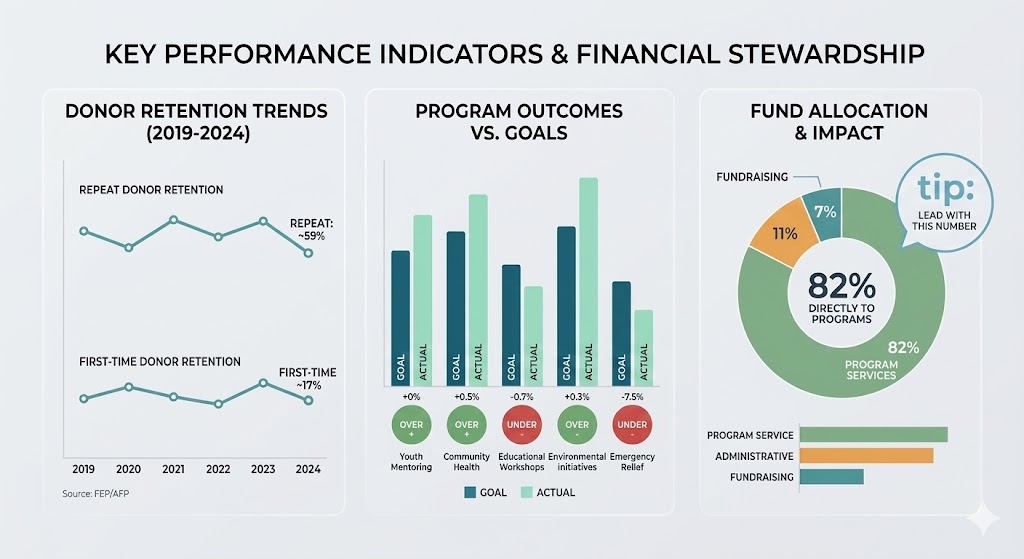
Example image – not real data – made with Google Gemini
Tools for Building Nonprofit Data Visualizations
You don’t need a design team to produce quality visualizations. Several tools are built specifically for nonprofits or work well within tight budgets.
For reports and infographics:
- Canva (free and paid tiers): drag-and-drop templates for charts, infographics, and full report layouts; strong for teams without design resources – Check out our Canva for Nonprofits Guide
- Piktochart: purpose-built for infographics and reports; strong nonprofit template library
- Visme: handles presentations, data visuals, and web-based reports in one platform
For dashboards and live data:
- Google Looker Studio (free): connects to Google Sheets, GA4, and most CRMs; good for real-time donor dashboards shared with boards
- Databox: pre-built nonprofit KPI dashboard templates; connects to most fundraising platforms
- Tableau Public (free): more technical but extremely flexible for complex data sets
For automated impact reporting:
- Funraise Fundraising Intelligence: pulls fundraising data and generates visual dashboards automatically; strong for mid-size organizations that need scalable reporting without manual work
Use AI to build data visualization reporting – Check out our AI for Nonprofits Guide
- Google Gemini – Nano Banana Image Generator
- ChatGPT image generator
Tip: AI image generation is best used for one off images, the platforms we mentioned above is for long term image and data visualization options.
The most important factor is not the tool: it’s the quality of the underlying data. Visualizations are only as accurate as your CRM and financial records. Before investing in reporting tools, make sure your expense tracking and donor data are clean and consistent.
This is where nonprofit-specific financial infrastructure matters. Organizations using Charity Charge can reconcile card expenses, tag transactions to programs or grant codes, and export clean data directly into their accounting system, which makes building accurate program-cost visualizations significantly faster.
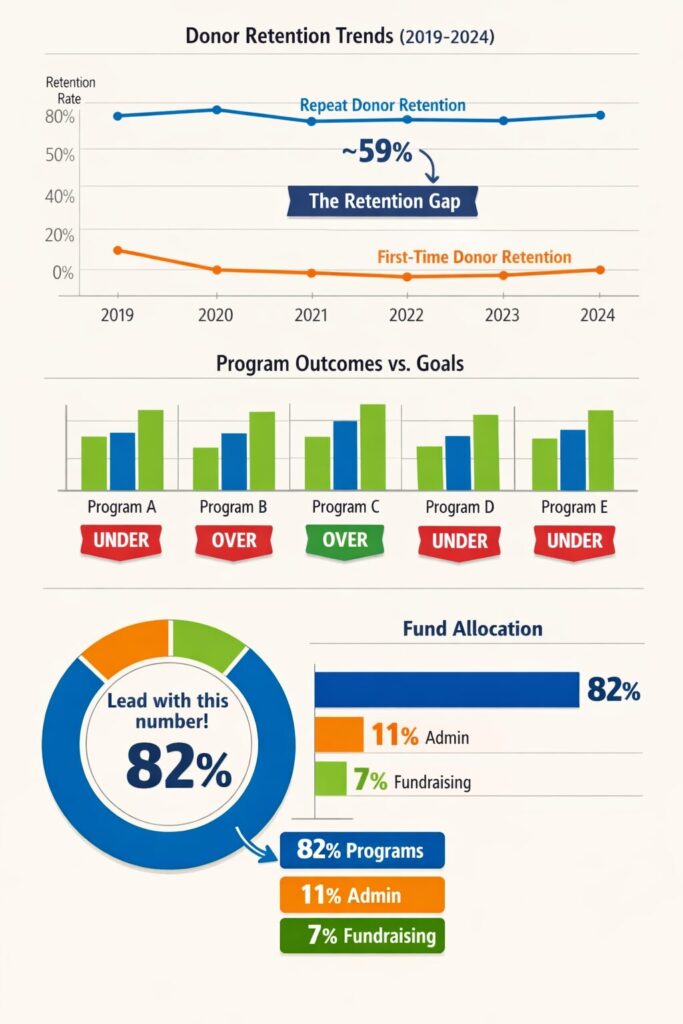
Example image – not real data – made with ChatGPT
Matching Visualizations to Report Formats
Impact reports get delivered through multiple channels. The visualization approach should match the medium.
Annual PDF report: Use high-resolution charts and infographics. Prioritize print-friendly layouts. Include a one-page “highlights” section at the front for donors who won’t read the full document.
Interactive web report: Add toggle filters, clickable data points, and embedded video. Organizations like the American Heart Association and Feeding America produce interactive annual reports that let stakeholders filter by program, region, or year.
Email impact update: Keep it to 1-3 visualizations maximum. A single progress bar toward an annual goal, paired with one outcome stat and one human story, is more effective than a miniaturized version of the full report.
Social media graphics: Pull the single most compelling number from your report. “Your support helped 2,400 families access emergency housing this year” with a bold visual performs far better than trying to compress a full report into a grid post.
Common Impact Reporting Mistakes to Avoid
These are the patterns that consistently undermine otherwise solid reports.
Reporting outputs instead of outcomes. “We distributed 10,000 meals” is an output. “We reduced food insecurity among program participants by 34%” is an outcome. Donors want to know what changed, not what you did.
Using the wrong chart for the data. Pie charts work for proportions, not for showing trends over time. Using a pie chart to display month-over-month growth distorts the story. Match the chart type to what the data is actually communicating.
Skipping financial transparency. Donors notice when it’s absent. A single clear fund-allocation chart removes more donor objections than almost any other element in a report.
Designing for print in a digital-first context. Most donors receive impact reports by email or access them on mobile. Dense, multi-column PDF layouts that work beautifully printed become unreadable on a phone screen.
No call to action. An impact report that ends without directing the donor toward a next step leaves engagement on the table. Every report should close with a specific, relevant ask.
How Charity Charge Supports Impact Reporting
Accurate impact reporting starts with clean financial data. One of the most frequent problems nonprofit finance teams face when building program-cost visualizations is reconciling expenses that were split across multiple cards, entered inconsistently, or coded to the wrong program.
Charity Charge’s nonprofit corporate card and expense management platform lets organizations tag every transaction to a specific program, grant, or cost center in real time. When it’s time to build your impact report, expense data by program is already categorized and exportable. No manual reconciliation, no spreadsheet archaeology.
The result: your finance team spends less time cleaning data and more time building the charts that donors actually see.
FAQs
Donors, especially those in the 2026 landscape, prioritize scannability and “Information Gain”. While spreadsheets are necessary for internal bookkeeping and accounting , they often create a “friction point” for external supporters. Visualizations transform dense financial data into an emotional narrative that donors can process instantly, allowing them to see the direct correlation between their gift and your mission’s success.
Your report should move beyond simple “inputs” and focus on “outcomes”. Key metrics to visualize include:
-
The Problem vs. Your Solution: Clearly articulate the specific problem your organization solves.
-
Real-Life Stories: Share testimonials and data points from the individuals your nonprofit is helping.
-
Giving Tiers: Show exactly what different dollar amounts accomplish (e.g., “What a $50 donation provides”).
-
Financial Growth: Use data from your CRM to show community growth and donor engagement over time.
Transparency is built on a foundation of professional financial tools.
-
Real-Time Tracking: Use credit cards designed for nonprofits that offer real-time controls and robust protections.
-
Separate Accounts: Maintain nonprofit best practices by separating organizational and personal funds through dedicated banking.
-
Professional Oversight: Leverage licensed bookkeeping and accounting services tailored to nonprofits to ensure your data is audit-ready and compliant.
Following a consistent visual identity is crucial for building trust (E-E-A-T).
-
Hierarchy: Use bold contrast to highlight your Call to Action (CTA) and “Impact Wins”.
-
Typography: Utilize clean, modern fonts like Roboto for body text and navigation, and Merriweather for mission statements and quotes.
-
The “Rule of Three”: To avoid overwhelming the reader, try to provide only three value propositions in any single section.
-
Genuine Imagery: Use light-hearted, genuine photos of your nonprofit in action rather than generic stock photos
Yes. Many successful nonprofits started with just a mission and a story. By using transparent, accessible financial tools with no annual fees and no platform fees for gift cards, smaller organizations can reallocate those saved funds toward storytelling and mission growth.